

Certain security threats only become visible when a user logs in, which presents a major issue for security businesses thinking about gray box penetration testing. Issues with permissions, account features, APIs, and protected data may stay hidden during external testing because those areas are not publicly accessible. This impacts customer portals, employee systems, authenticated applications, and APIs. In these contexts, a more in-depth examination can disclose how legitimate access might be abused and hazards that external testing may not detect.
In this guide, you’ll learn what gray box penetration testing is, what information testers receive, when to use it, how its methodology and process work.

What Is Gray Box Penetration Testing in Cybersecurity?
Gray box penetration testing is a security assessment where the tester receives partial knowledge or limited access to the target environment. The tester may receive valid user credentials, API documentation, selected system details, or information about specific user roles. However, they usually do not receive complete source code, full administrator access, or detailed knowledge of the entire environment.
This allows the tester to examine security from the position of someone who already has limited access, such as a customer, employee, contractor, or attacker who has compromised a valid account. The goal is to identify weaknesses that may become visible after authentication. These may include broken access controls, privilege escalation, session weaknesses, API vulnerabilities, and business logic flaws.
What Information Is Provided in a Gray Box Penetration Test?
The information provided depends on the scope and goals of the assessment. A tester may receive valid user credentials, details about different user roles, API documentation, application URLs, selected network information, or limited architecture details. Test accounts may also be provided with different permission levels. This allows the tester to compare what a normal user, employee, manager, or other role is allowed to access.
The important point is that the tester does not receive complete internal knowledge. They know more than they would during black box testing but have less visibility than they would during a full white box assessment.
Why Is Gray Box Penetration Testing Important?
Gray box penetration testing is important because many serious security risks are hidden behind login pages and authenticated functions. A public visitor may never reach these areas, but a legitimate user, compromised account, or insider may already have access to them. This type of penetration testing helps security teams understand what could happen after that access is gained.
It can reveal whether users can view data they should not see, reach functions outside their role, abuse APIs, or move from a standard account to higher privileges. That matters because weaknesses in access controls, sessions, business logic, and authenticated APIs can expose sensitive data or give users more control than intended. Testing these areas helps teams find problems that external-only testing may miss.
Because testers receive some information in advance, they can also spend less time on basic discovery and more time examining higher-risk parts of the environment. This makes gray box penetration testing useful for customer portals, employee systems, authenticated applications, and APIs where security depends heavily on permissions and user access.
When Should You Use Gray Box Penetration Testing?
Gray box penetration testing is useful when security teams need access to protected areas without providing complete internal visibility. Gray box testing may also be combined with black box penetration testing or white box penetration testing when an organization needs broader security coverage. Common situations include:
- Testing applications that require login credentials.
- Reviewing customer or employee portals.
- Checking different user permission levels.
- Assessing authenticated APIs.
- Testing role-based access controls.
- Looking for privilege escalation risks.
- Reviewing sensitive business workflows.
- Checking what a compromised account could access.
Gray Box Penetration Testing Methodology
A gray box penetration testing methodology defines how testers use the limited information and access provided during an assessment. The methodology focuses on examining authenticated areas, permissions, workflows, and security controls while keeping the tester’s overall knowledge of the environment limited.
Access-Based Testing
The tester uses the credentials and permissions supplied for the assessment to reach protected areas. This provides access to functions that public or unauthenticated users cannot see, allowing the tester to examine security controls inside the application.
Role-Based Testing
Different account roles are compared to determine whether each user can access only the data and functions intended for them. For example, the tester may compare the permissions of a normal employee account with those of a manager account.
Risk-Focused Testing
Testing gives closer attention to areas where limited access could lead to a more serious security issue. Sensitive data, financial functions, administrative tools, APIs, account settings, and other high-value workflows may receive deeper testing.
Manual Validation
Automated tools may identify possible vulnerabilities, but important findings are also checked manually. Manual testing is especially useful for access control and business logic issues because automated scanners may not understand how a workflow is supposed to behave.
Controlled Exploitation
Confirmed vulnerabilities may be safely tested within the approved scope. The purpose is to determine what access or impact a weakness could create rather than reporting a possible issue without validation.
Impact-Based Analysis
Findings are reviewed based on how easily they may be exploited and what could happen if exploitation succeeds. This helps security teams understand which vulnerabilities should receive attention first.
Gray Box Penetration Testing Process
The gray box penetration testing process moves from defining access and scope to testing, validating findings, and confirming that fixes work.
Define Scope
The organization defines which applications, systems, APIs, accounts, and user roles are included in the assessment. Testing limits, restricted actions, and approved access are also agreed before testing begins.
Review Provided Context
The tester reviews credentials, documentation, technical details, and other information provided for the assessment. This helps focus testing on the areas most likely to require deeper security review.
Test Authenticated Areas
Using the approved accounts, the tester examines dashboards, account settings, customer portals, employee tools, APIs, and other protected features. Testing focuses on authentication, authorization, sessions, permissions, business logic, and configuration weaknesses.
Validate Risks
Potential vulnerabilities are tested to confirm whether they create a real security risk. The tester also checks what additional access or actions may become possible, helping security teams separate serious findings from false positives or low-impact issues.
Report, Fix, and Retest
Confirmed findings are documented with evidence, affected areas, potential impact, and remediation guidance. After fixes are applied, the affected areas are tested again to confirm that the vulnerabilities have been resolved and the security controls work as intended.
What Can Gray Box Penetration Testing Uncover?
Gray box penetration testing is useful for uncovering security weaknesses that appear after a user gains legitimate access. Because testers work with limited credentials or internal knowledge, they can examine authenticated areas, user permissions, APIs, sessions, account functions, and business workflows that may not be visible during external testing. This makes it easier to find weaknesses that could allow users to access data, features, or privileges beyond what they should have.
- Broken Access Controls: Users may be able to view, change, or access information outside their assigned permissions. For example, changing an identifier in a request may expose another user’s data.
- Privilege Escalation: A standard user may gain access to manager, administrator, or other higher-level functions that should be restricted.
- Session Weaknesses: Testing may uncover issues with login controls, password resets, session expiration, logout behavior, or session tokens that could allow unauthorized access.
- Business Logic Flaws: Legitimate features may be used in unintended ways, such as skipping approval steps or completing actions in an order that should not be allowed.
- API Security Issues: Weak authorization in authenticated APIs may allow users to access data or functions belonging to other accounts.
- Misconfigurations: Incorrect permissions, insecure settings, debug information, or detailed error messages may expose sensitive data or create additional attack paths.
Gray Box Testing Techniques With Examples
Gray Box Testing Techniques are those methods that are used to examine security after the tester receives limited access or system information. These techniques focus on authenticated functions, permissions, user roles, APIs, sessions, and business processes.
Authenticated Testing
Authenticated testing examines areas that become available after a user signs in.
Example:
A tester logs in with a normal customer account and reviews the profile, account settings, order history, and other protected areas. They check whether sensitive functions are properly protected from unauthorized actions.
Role-Based Access Testing
This technique checks whether each user role can access only the information and functions intended for that role.
Example:
A tester signs in with an employee account and attempts to open a manager-only approval page. If the page is available without proper authorization, the role restrictions may not be working correctly.
Privilege Escalation Testing
Privilege escalation testing checks whether a lower-level account can gain access to higher-level permissions or functions.
Example:
A tester uses a standard account and changes a request related to user permissions. If the application accepts the change and grants access to administrator features, it may indicate a privilege escalation weakness.
Business Logic Testing
Business logic testing checks whether normal application processes can be used in unintended ways.
Example:
A refund process requires supervisor approval. The tester changes the order of requests and discovers that the refund can be completed without receiving that approval.
API Security Testing
The tester examines authenticated API requests for weak authorization, data exposure, and improper access controls.
Example:
An API request contains the ID of the logged-in customer. The tester changes that ID to another customer’s number. If the API returns the other customer’s data, the authorization control may be broken.
Session and Access Control Testing
This technique examines how the application manages active sessions and account access.
Example:
A tester changes the password for an account and then checks an older browser session. If that session remains active when it should have been invalidated, someone with a stolen session may continue using the account.
Manual and Exploratory Testing
Manual testing allows the tester to investigate unusual application behavior that automated tools may miss.
Example:
One feature exposes an internal record number. The tester discovers that another feature accepts the same number without checking who owns the record. Combining these behaviors may allow access to another user’s information.
Gray Box Penetration Test Example
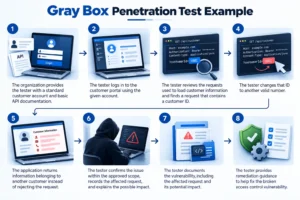
A practical gray box penetration test example is an assessment of an online customer portal. The organization gives the tester a standard customer account and basic API documentation. The tester does not receive source code or administrator access. After logging in, the tester reviews the requests used to load customer information. One request contains a customer ID.
The tester changes that ID to another valid number. If the application returns information belonging to another customer instead of rejecting the request, it may indicate a broken access control vulnerability. The tester then confirms the issue within the approved scope, records the affected request, explains the possible impact, and provides remediation guidance. This type of weakness may be difficult to identify through external-only testing because access to the authenticated customer area is required first.
Advantages and Disadvantages of Gray Box Penetration Testing
Gray box pentesting combines some of the external perspective of black box testing with some of the additional visibility available in white box testing.
Advantages | Disadvantages |
Provides access to authenticated areas | Does not provide complete internal visibility |
Useful for testing permissions and user roles | Some code-level weaknesses may remain hidden |
Reduces time spent on basic discovery | Results depend on the access and information provided |
| Helps identify privilege escalation | Less representative of a completely external attack |
| Useful for API and business logic testing | Does not provide the depth of full white box testing |
| Supports focused testing of higher-risk workflows | Poorly defined access may create coverage gaps |
Gray Box Penetration Testing Tools
Gray box penetration testing tools help testers examine authenticated areas, APIs, user roles, network management services, and potential vulnerabilities using the limited access provided for the assessment. Most tests use several tools together because no single tool can cover every part of the environment.
Tools make the assessment faster, but gray box penetration testing still depends heavily on manual investigation. Issues such as broken access controls, privilege escalation, business logic flaws, and role-based permission problems often require a tester to understand how the application is supposed to work and then check whether those rules can be bypassed.
| Tool Category | Purpose | Examples |
| Web application testing | Test authenticated pages, requests, sessions, and application behavior | Burp Suite, OWASP ZAP |
| API testing | Examine authenticated API requests, responses, permissions, and data access | Postman, Burp Suite |
| Network scanning | Identify reachable hosts, ports, and services within the approved scope | Nmap, Masscan |
| Vulnerability scanning | Find known vulnerabilities and insecure configurations | Nessus, OpenVAS, Qualys |
| Authentication and session testing | Review login controls, cookies, tokens, and session behavior | Burp Suite, OWASP ZAP |
| Access control testing | Check whether different users and roles can reach restricted data or functions | Burp Suite, Postman |
| Exploitation and validation | Confirm whether selected vulnerabilities create a real security risk | Metasploit |
How CyberZEALS Conducts Gray Box Penetration Testing
CyberZEALS works with the level of access and information agreed before the assessment begins. Testing may combine automated scanning with manual analysis to examine authenticated areas, permissions, APIs, business logic, and other systems included in the scope. Confirmed findings are reviewed based on exploitability and possible impact. We provides supporting evidence and remediation guidance so security and development teams can understand what needs attention.
We supports gray box penetration testing through services such as:
- Penetration Testing Services in USA : Assess systems using the agreed level of access and validate security weaknesses within the approved scope.
- Application Penetration Testing in USA : Examine authenticated application areas, user permissions, sessions, access controls, and business workflows.
- Network Penetration Testing in USA : Assess network systems when limited credentials or selected internal information are included in the engagement.
Frequently Asked Questions
Does Gray Box Penetration Testing Require Login Credentials?
Usually, yes. Test credentials are often provided to access authenticated areas.
Is Gray Box Penetration Testing Better Than Black Box Testing?
Not always. Gray box testing offers deeper access, while black box testing focuses on an external attacker’s view.
Can Gray Box Testing Find Business Logic Vulnerabilities?
Yes. It can reveal flaws in authenticated workflows and application processes.
Does Gray Box Penetration Testing Test Privilege Escalation?
Yes. Testers check whether lower-level users can gain higher permissions.
How Long Does a Gray Box Penetration Test Take?
It depends on the scope, system complexity, user roles, and testing depth.
Is Gray Box Penetration Testing the Same as Authenticated Testing?
Not exactly. Authenticated testing may be part of gray box testing, but gray box assessments can include additional technical information.
What Access Is Given to a Gray Box Penetration Tester?
Access may include user credentials, selected roles, API documentation, or limited system details.
Should Vulnerabilities Be Retested After Remediation?
Yes. Retesting confirms that the fix works and the vulnerability is resolved.